
Vent open/close

-
Official comment

Hi Nico,
It sounds like Mode might be set to Auto Heat/Cool. For this mode, Flair uses heat-to and cool-to set points that are 2F above and below the set point defined in Flair. So for a 73F set point, the heat-to set point is 71F and the cool-to set point is 75F.
Seems like your system is heating, so Flair will be using the 71F set point. Flair adds a 1F range around set points for changing Smart Vent position, so the operating range is 70F to 72F.
A closed Smart Vent would open when the room temperature drops below 70F.
This article explains more:
How does Flair switch between heating and cooling?
We understand that this is a bit elusive and are planning changes to make this more visible and intuitive in the Flair app.
All the best,
Finn
Comment actions -

When flair controls the set point, it uses the average of all active rooms.
Looks like you have 7 temperature sensors used in the average.If there are rooms you don't want in the average, try manually changing them to away.
If this works, you can add flair schedules for active/away. -

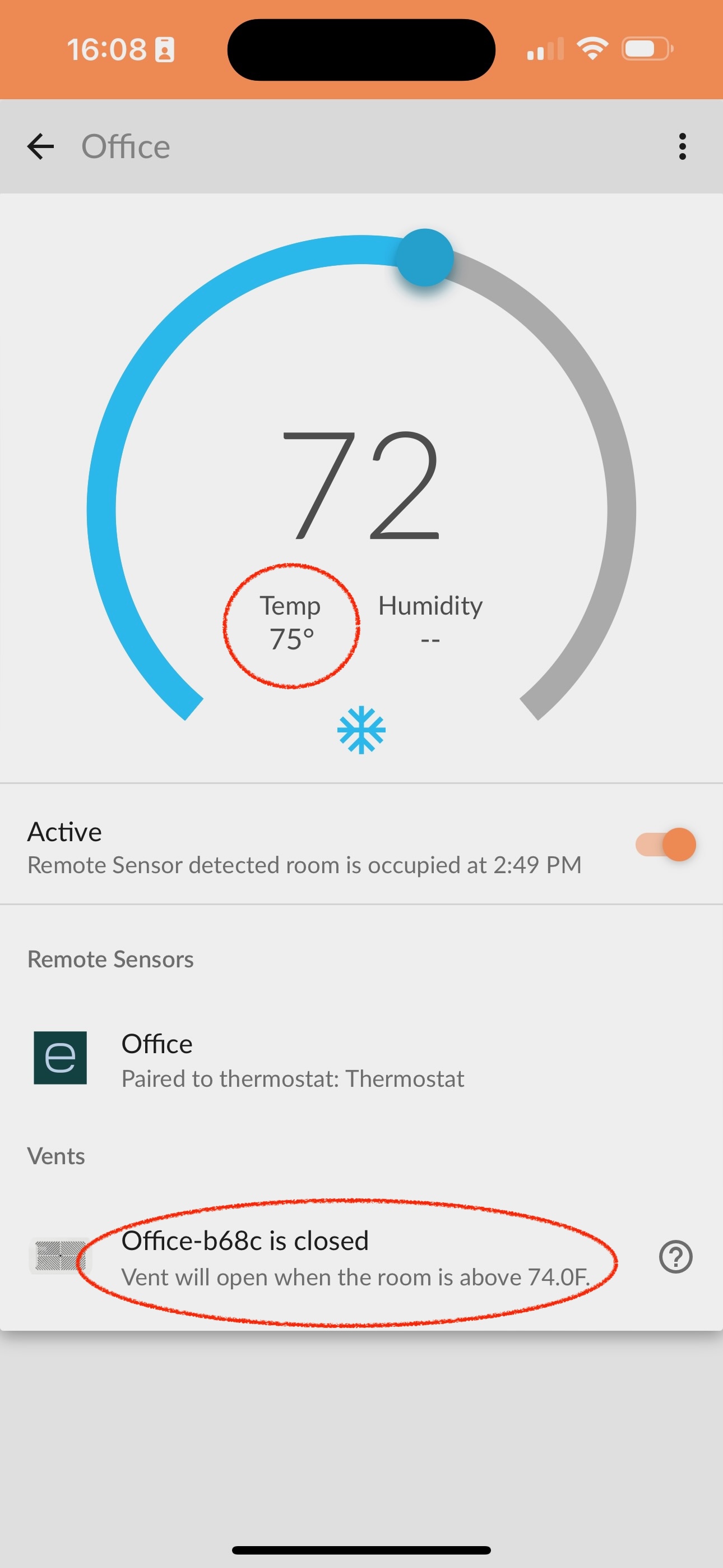
I am seeing a similar problem. I often have rooms that are very warm - at or above the temp where the vent *should* be open, and yet they stay closed while the A/C is running. I sometime have to switch out of Auto into Manual mode, manually trigger the vent to open, and then go back to Auto. Here is a screenshot I just took of exactly that situation:
Please sign in to leave a comment.
Comments
3 comments